Technology & Computing · Cybersecurity & privacy
HTTPS and how a website proves who it is
See what the padlock in your browser promises, what a website's certificate says, who vouches for it, and how a site gets one automatically.
What you will learn
- Name the three protections TLS provides and what its handshake settles
- Explain how a connection can be stripped before TLS begins and what guards against it
- Say what a certificate contains and what makes it convincing
- List the checks a client makes before it accepts a certificate
Lesson 1 of 4 · 6 min
The three things a secure connection promises
You're on coffee shop Wi-Fi, typing a card number into a shop's website. The padlock is showing, so the connection is encrypted. Encrypted to whom?
The padlock comes from Transport Layer Security, or TLS, the protocol that turns HTTP into HTTPS. It makes three promises. Encryption means nobody on the network can read the data in transit. Integrity means nobody can change it without being detected. Authentication means the other party has proved it is who it claims to be.
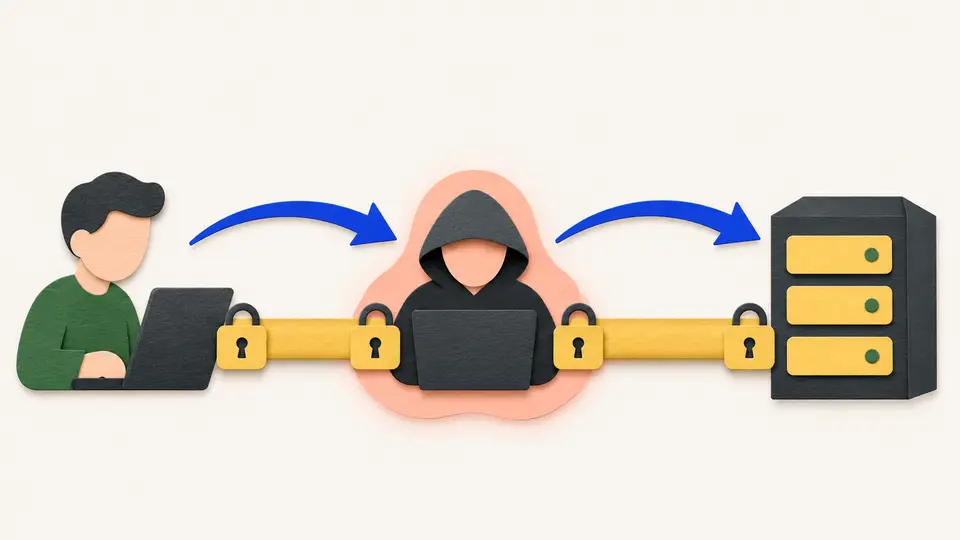
The third promise holds up the other two. TLS exists to stop a manipulator-in-the-middle attack, where an attacker slips in between your browser and the server and reads or changes what passes. That attacker can set up an encrypted link with you as easily as the shop can. Without authentication, encryption only guarantees that nobody else hears what you tell the wrong party.
On the web it's the server that proves itself, with a certificate. Your browser usually proves nothing, which is why the certificate belongs to the site.
All of this is settled in the handshake, before any content moves. Browser and server agree on a TLS version. Version 1.3 is the current one and the most widely used. They agree on the algorithms to use, called a cipher suite. The server authenticates itself. Then both sides agree on a secret key, which encrypts everything after that, headers included.
There's a moment before TLS starts, and an attacker can use it. Say you type a shop's address without the https, or follow an old link. Your browser asks for the page over plain HTTP, and a well-run site answers with a redirect to the secure version.
That redirect travels unprotected. An attacker in a position to intercept it can stop the upgrade from ever happening, and the rest of the visit stays readable. This is an SSL stripping attack, named after TLS's predecessor.
The defense is a header called Strict-Transport-Security, or HSTS. A site sends it to say it wants HTTPS only. Your browser remembers, and on later visits it goes straight to HTTPS, even if you type an insecure address.
That still leaves the very first visit exposed, and the first one after the instruction expires. So browsers go a step further. Chrome keeps a preload list of sites it will only ever contact over HTTPS, as if the header had already arrived. Safari and Firefox use lists derived from Chrome's.
A second gap sits inside secure pages. Mixed content is a page loaded over HTTPS that pulls in scripts or images over HTTP. Those parts get none of the protection, and a changed script can do anything inside a page you trust. So browsers refuse to load them. They upgrade the request to HTTPS or block it.
Try to recallA site redirects every plain HTTP request to HTTPS. Why isn't that enough, and what can be added to improve it?
The redirect itself travels over plain HTTP. An attacker who intercepts that first request can simply never deliver the redirect, and the visit stays unencrypted. That's SSL stripping.
The fix is the Strict-Transport-Security header, or HSTS. It tells the browser to use HTTPS for that site from then on, even when given an insecure address. The first visit is still exposed, and so is the first one after the instruction expires. A browser's preload list closes that gap for the sites on it.
So a padlock tells you three things, and the one that matters most is who you're talking to. Your browser decides that from a certificate, a document the server presents to prove it's the intended destination. Everything else a secure connection promises depends on that document being hard to fake.
Lessons in this topic
The three things a secure connection promises
HTTPS does more than hide your data. See why knowing who's at the other end matters most, and how a connection can be downgraded before the protection starts.
What a website's certificate says, and who says it
A certificate is a public key, a name and a third party's signature tying the two together. See the two checks your browser runs before it trusts one.
Who vouches for the certificate authority
Follow a certificate up its chain to a root that signed itself, and see why that root is trusted when another self-signed certificate isn't.
How a website gets a certificate with no human involved
Follow the automated challenge that lets a certificate authority confirm control of a domain, and the one step in it that can't be encrypted.
Three quick stories from this topic
Any authority, any site
Every certificate authority your browser trusts can vouch for any website in the world
Browsers ship with a built-in list of trusted authorities, many run by organizations you've never heard of. A certificate signed by any one of them is accepted as genuine for any site. You're relying on the browser's maker to keep that list clean.
Where the chain ends
A site's certificate is signed by an intermediate, which is signed by a root. The root signs itself, so the browser trusts it only because it came already installed.
When it has gone wrong
Fraudulent certificates have occasionally been issued. Browsers caught some of them, and in other cases time passed before the certificates were removed from browsers.
Certificates that expire fast
From March 2029, a certificate proving a website's identity will last at most 47 days
Let's Encrypt, the nonprofit that issues certificates free, has capped its own at 90 days since 2015. A short life means a stolen key or a wrongly issued certificate stops working sooner. Software handles the renewals, so nobody has to remember.
No human involved
A program on the web server proves it controls the domain by placing a file or a DNS record the authority asks for. The certificate then arrives automatically.
The check that can't be encrypted
The proof has to run without HTTPS, because the site doesn't have its certificate yet. Let's Encrypt checks from several network locations at once to make the test harder to fake.
Encrypted, but to whom
You can have a perfectly encrypted web connection and still be talking to an attacker
Encryption only keeps outsiders from reading along. An attacker who gets between you and a site can set up an encrypted link with you too. So before it encrypts anything, your browser checks the site's certificate to confirm who's at the other end.
The handshake settles four things
Client and server pick a protocol version and a cipher suite, optionally authenticate each other, and agree on a shared secret key. Only then does any content move.
The gap before it starts
A plain HTTP request can be intercepted before the redirect lands. HSTS closes that gap from the second visit onward.
Sources
- Transport Layer Security (TLS), Security, MDN Web Docs, Mozilla
- Public key certificate, Wikipedia
- Certificate Lifetime Rationale and Plans, Internet Security Research Group / Let's Encrypt
- How it works, Internet Security Research Group / Let's Encrypt